
Last updated on
Nov 7, 2026

Census QTR-200(MT) 2021-2026 free printable template
We are not affiliated with any brand or entity on this form

Fill out
Complete the form online in a simple drag-and-drop editor.

eSign
Add your legally binding signature or send the form for signing.

Share
Share the form via a link, letting anyone fill it out from any device.

Export
Download, print, email, or move the form to your cloud storage.
Why pdfFiller is the best tool for your documents and forms


End-to-end document management
From editing and signing to collaboration and tracking, pdfFiller has everything you need to get your documents done quickly and efficiently.
Accessible from anywhere
pdfFiller is fully cloud-based. This means you can edit, sign, and share documents from anywhere using your computer, smartphone, or tablet.
Secure and compliant
pdfFiller lets you securely manage documents following global laws like ESIGN, CCPA, and GDPR. It's also HIPAA and SOC 2 compliant.
What is Census QTR-200(MT)
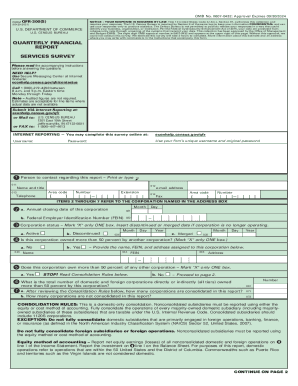
The Quarterly Financial Report Form QFR-200(MT) is a government document used by U.S. corporations in manufacturing, mining, retail, and wholesale trade to report their financial data quarterly.
pdfFiller scores top ratings on review platforms




Who needs Census QTR-200(MT)?
Explore how professionals across industries use pdfFiller.

Census QTR-200(MT) is needed by:
-
Manufacturing corporations
-
Mining companies
-
Retail corporations
-
Wholesale trade businesses
-
Financial analysts
-
Census Bureau compliance officers
Comprehensive Guide to Census QTR-200(MT)
Understanding the Quarterly Financial Report Form QFR-200(MT)
The Quarterly Financial Report Form QFR-200(MT) is a critical document used by businesses in manufacturing, mining, retail, and wholesale trades to report their quarterly financial performance. This form collects essential financial data, aiding organizations in maintaining transparency and regulatory compliance. The U.S. Census Bureau oversees the administration and use of the QFR-200(MT), ensuring that submitted data is utilized effectively for statistical analysis.
-
Definition: The QFR-200(MT) is a standardized form for reporting financial information.
-
Significance: It helps businesses fulfill legal reporting obligations.
-
Government oversight: Managed by the U.S. Census Bureau, enhancing data accuracy and consistency.
Purpose and Benefits of the QFR-200(MT)
Completing the QFR-200(MT) provides several advantages for businesses, including increased transparency and accuracy in financial reporting. Under Title 13 U.S.C., Section 9, organizations are legally required to submit this form, reinforcing the need for adherence. Additionally, the confidentiality of the data collected is strictly maintained, assuring businesses that their sensitive information remains protected.
-
Enhances financial transparency.
-
Ensures compliance with federal regulations.
-
Promotes accuracy in reported financial data.
Who Needs to Fill Out the QFR-200(MT)?
The QFR-200(MT) must be completed by various types of businesses primarily involved in manufacturing, mining, retail, and wholesale trades. However, certain criteria exist that determine eligibility for submission. Organizations that do not meet the specific thresholds or fall under certain exemptions may not be required to fill out this form.
-
Mandatory for manufacturing and mining sectors.
-
Applicable to retail and wholesale trades.
-
Exemptions may apply based on size or nature of business.
Essential Information Required for the QFR-200(MT)
To complete the QFR-200(MT) accurately, businesses must gather specific information and documentation beforehand. Key fields to be filled out include the Federal Employer Identification Number (FEIN), corporation status, and various financial data types. Ensuring accuracy in these fields is crucial for compliance with reporting standards.
-
Federal Employer Identification Number (FEIN).
-
Corporation status (e.g., for-profit or non-profit).
-
Detailed financial data, including income statements and balance sheets.
Step-by-Step Guide to Completing the QFR-200(MT) Online
Users can fill out the QFR-200(MT) electronically using pdfFiller, which streamlines the submission process. This step-by-step guide outlines how to utilize the pdfFiller platform to complete the form and submit it without hassle.
-
Access the form using pdfFiller.
-
Fill out each required field, ensuring accuracy.
-
Review the form to avoid common errors.
-
Submit electronically through the platform.
Submission Methods for the QFR-200(MT)
There are two primary methods for submitting the QFR-200(MT): online via pdfFiller or by traditional mail. Understanding the submission process helps ensure timely filing and adherence to deadlines.
-
Online submission via pdfFiller for faster processing.
-
Mail submission is also an option, though it may take longer.
-
Be aware of submission deadlines to avoid penalties.
Security and Compliance When Filling Out the QFR-200(MT)
When completing the QFR-200(MT), it is essential to prioritize the security of sensitive data. pdfFiller employs robust security measures, such as encryption and compliance with industry standards, to protect user information throughout the submission process. Practicing good privacy habits during form completion further safeguards business data.
-
Utilize pdfFiller's encryption for secure submissions.
-
Follow best practices to maintain data privacy.
-
Be aware of compliance standards related to financial reporting.
Common Errors and How to Avoid Them While Filling Out the QFR-200(MT)
Many users encounter common mistakes when filling out the QFR-200(MT). Being aware of these errors can help businesses submit accurate forms on the first attempt.
-
Incomplete or inaccurate financial data entries.
-
Failure to review the form before submission.
-
Not addressing errors promptly after submission.
What Happens After Submitting the QFR-200(MT)?
After submitting the QFR-200(MT), businesses can expect a series of processes regarding their submission. This includes receiving confirmation emails and understanding the timeline for processing their financial data.
-
Processing times may vary, so check for updates regularly.
-
Confirmation emails will be sent upon successful submission.
-
Potential follow-up communications may occur from the U.S. Census Bureau.
Make Your QFR-200(MT) Submission Hassle-Free with pdfFiller
Utilizing pdfFiller enhances the experience of filling out the QFR-200(MT) by providing various helpful features. Users enjoy the benefits of streamlined form filling and eSigning while ensuring compliance with security protocols.
-
Features like easy editing and eSigning simplify the process.
-
Security measures ensure the protection of sensitive information.
-
Starting your form is quick and user-friendly with pdfFiller.
How to fill out the Census QTR-200(MT)
-
1.Access the Quarterly Financial Report Form QFR-200(MT) on pdfFiller by searching for the form in the available templates or using the provided link.
-
2.Once opened, navigate through the form using the scrolling feature to review all sections.
-
3.Begin by gathering necessary financial information including your company's income statements, balance sheets, and other financial data before starting to fill the form.
-
4.Use the fillable fields to input your data, such as your company name, Federal Employer Identification Number (FEIN), and any required financial figures.
-
5.Make sure to thoroughly check the instructions provided with the form to avoid missing any required fields, specifically if there are any legal statements to acknowledge.
-
6.Review each entry to confirm accuracy and completeness. Utilize pdfFiller's preview feature to see how your filled form will appear.
-
7.Save your work regularly to prevent data loss, and once completed, choose your preferred method for submission, either online or save it for mailing.
-
8.After ensuring that all information is correct, download the finalized form as a PDF or submit it directly through pdfFiller, following any prompts for submission as required.

Who is eligible to fill out the Quarterly Financial Report Form QFR-200(MT)?
The form is required for U.S. corporations involved in manufacturing, mining, retail, and wholesale trade. Ensure you have the necessary financial data prepared for accurate completion.
What is the deadline for submitting the Quarterly Financial Report Form QFR-200(MT)?
Submission deadlines may vary, so it is essential to check the official Census Bureau website or your guidance documents for specific deadlines related to the quarter being reported.
How can I submit the Quarterly Financial Report Form QFR-200(MT)?
You can submit the form online via pdfFiller or print and mail it to the designated address provided in the instructions. Ensure proper submission methods are followed.
What supporting documents do I need to submit with this form?
Typically, you will need to include your income statements, balance sheets, and any additional financial data required by the form. Check the form's instructions for specifics on supporting documents.
What are common mistakes to avoid when completing this form?
Common mistakes include missing required fields, failing to read instructions carefully, and submitting inaccurate financial figures. Double-check your entries before final submission.
How long does it take to process the Quarterly Financial Report Form QFR-200(MT)?
Processing times can vary based on the volume of submissions and compliance checks, but generally, processing may take several weeks. Check online for estimated times specific to that quarter.
What should I do if I have questions while filling out the form?
If you have questions, consult the accompanying instructions that come with the form, or visit the U.S. Census Bureau's official site for additional resources and contact information.
Census QTR-200(MT) Form Versions
Related Content
Related Forms




Get the latest insights from our blog


If you believe that this page should be taken down, please follow our DMCA take down process
here
.
This form may include fields for payment information. Data entered in these fields is not covered by PCI DSS compliance.